Zero Cloud.
Sovereign Mobile Vault.
An offline-first password & credential manager built for Android, iOS, and Web. Powered by NIST SP 800-63B compliant PBKDF2 (310,000 iterations), AES-256 encryption, BIP-39 HD key derivation, and monotonic clock-tamper session guards.
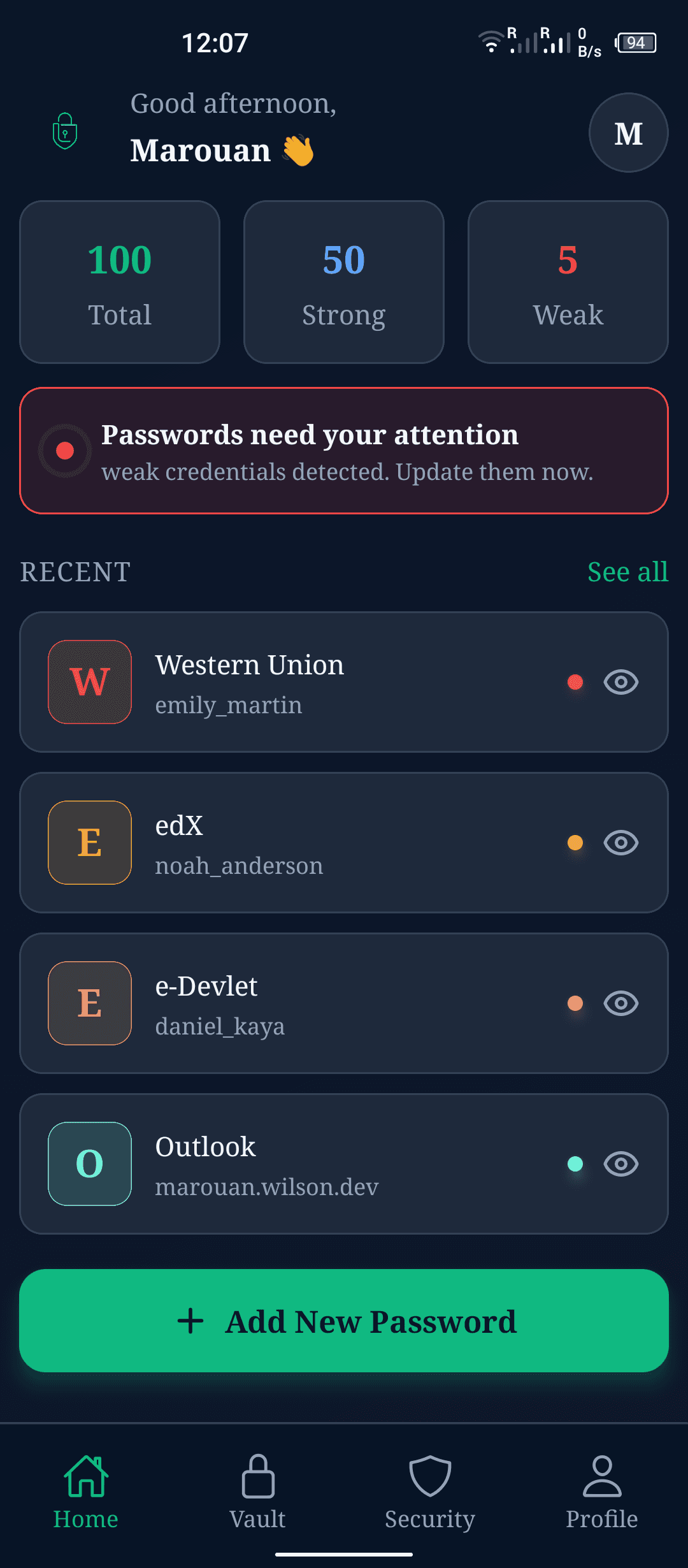
Zero Network Sockets
100% offline local privacy
PBKDF2 310,000 Iterations
NIST SP 800-63B C++ quick-crypto
BIP-39 HD Key Tree
12-word seed & HD key paths
Monotonic Auto-Lock
Resists OS clock manipulation
Built for Standard-Compliant Cryptography & Sovereign Local Privacy
Lockora combines NIST-recommended PBKDF2 key derivation, BIP-39 HD key trees, zxcvbn strength auditing, and relative monotonic auto-lock guards into an offline React Native & Expo SDK 54 core.
NIST-Compliant PBKDF2 & AES-256
310,000 Iterations & Constant-Time Validation
Uses PBKDF2-HMAC-SHA256 with 310,000 iterations and 16-byte random salt adhering strictly to NIST SP 800-63B. Hash comparisons execute via constant-time XOR byte loops (timingSafeEqual) to eliminate side-channel timing attacks.
Hierarchical HD Key Tree (BIP-39)
12-Word Mnemonic Identity & Derivation
Identity and vault keys derive from a standard 12-word BIP-39 seed phrase (128-bit entropy). HD paths separate public identity verification (m/0'/0) from symmetric vault encryption keys (m/1'/0).
Monotonic Inactivity Auto-Lock
Clock-Tamper Resistant High-Res Timer
Session protection relies on high-resolution relative monotonic timing (performance.now()) rather than system clock time, preventing attackers from bypassing auto-lock by altering device clock settings.
Risk Analysis & Security Audit Engine
zxcvbn Strength, Stale & Reused Password Detection
Embedded security dashboard calculates real-time vault health. Scans credentials for password reuse, flags credentials modified over 90 days ago, and alerts on weak passwords (zxcvbn score ≤ 2).
Entropy-Based Password Generator
60-Bit Guaranteed Minimum Security Floor
Generates cryptographically safe passwords using dynamic character pool sizing, enforcing a strict minimum floor of 60 bits of entropy [L × log2(Pool Size)] with Fisher-Yates array shuffling.
Dual-Format Backup & Restore
Encrypted JSON & Printable PDF Exports
Export vault contents to structured JSON backups (.lockora) or landscape styled printable PDF reports using Expo FileSystem v19 Storage Access Framework (SAF) without requiring dangerous storage permissions.
Why Zero-Trust Local Architecture Beats Cloud Vaults
Compare Lockora's NIST SP 800-63B compliant PBKDF2 local-first model directly against standard cloud password managers.
| Feature / Specification | Lockora (Zero-Trust Local) | Standard Cloud Managers |
|---|---|---|
| Network Socket Permissions | Zero Network Sockets | Mandatory Internet Access |
| Master Key Derivation (KDF) | PBKDF2-SHA256 (310,000 Iterations) | Legacy SHA-256 or Low Iterations |
| Side-Channel Timing Protection | Constant-Time XOR (timingSafeEqual) | Standard String Comparison |
| Hierarchical Key Management | BIP-39 Mnemonic & HD Paths (m/0', m/1') | Single Master Key Derivation |
| Session Auto-Lock Security | Monotonic Timer (performance.now()) | System Date.now() (Clock Manipulable) |
| Vault Health & Risk Auditing | zxcvbn Scoring + Reused/Stale Checks | Basic Length Check Only |
| Backup & Physical Recovery | 12-Word BIP-39 Seed + JSON/PDF Export | Cloud Database Sync Only |
How to Download & Install Lockora APK
Sideloading on Android gives you 100% control over app integrity without relying on third-party app stores.
Download Release Package
Retrieve the official signed Android release package (`lockora-v1.1.0.apk`, ~140 MB) built on Expo SDK 54 with native C++ quick-crypto bindings.
Verify SHA-256 Hash
Ensure package integrity by checking the downloaded binary's SHA-256 hash in Terminal or using a checksum tool.
sha256sum lockora-v1.1.0.apkℹ️ Expected Hash: d1a3900b2394f59825e4d6ec0daddd7b0e155444e70732f3574bd6f13ffe7055
Allow App Installation
On Android, enable 'Allow from this source' for your browser or file manager under Settings > Security & Apps.
ℹ️ Android isolates sideloading permissions per installer app for OS security.
Onboard & Backup Seed
Launch Lockora, create your master password, and write down your 12-word BIP-39 recovery seed phrase on paper.
ℹ️ Verify 0 network sockets used under App Info > Data Usage anytime.
What You Must Keep In Mind
Sovereign security means absolute data ownership. Understanding how zero-cloud storage operates keeps your vault safe.
Zero Remote Cloud Recovery Server
Because Lockora operates 100% locally with zero cloud backend, there is NO remote 'forgot password' server or cloud backdoor.
Save your 12-word BIP-39 recovery seed phrase during registration in a safe physical place. If you forget your master password, your seed phrase is the only way to recover your vault.
Device Data Isolation & Encrypted Backups
Vault data resides on local device storage. Physical device loss or destruction permanently erases local data if unbacked.
Use Lockora's export manager to generate periodic encrypted JSON backups (.lockora) or printable landscape PDF backups to store on offline USB storage.
Manual Release Package Updates
Release updates are installed by downloading signed release packages over existing installations without telemetry polling.
Download new version APKs directly from this official landing page. Android's OS package manager performs an in-place upgrade while preserving your encrypted vault.
Quick Questions & Answers
Everything you need to know about Lockora's architecture, security model, and direct APK download.
All credentials and notes are encrypted on-device with AES-256 in CBC mode before being saved to local storage. Neither master passphrases, raw keys, nor unencrypted secrets ever touch a network socket, cloud database, or third-party telemetric server.